



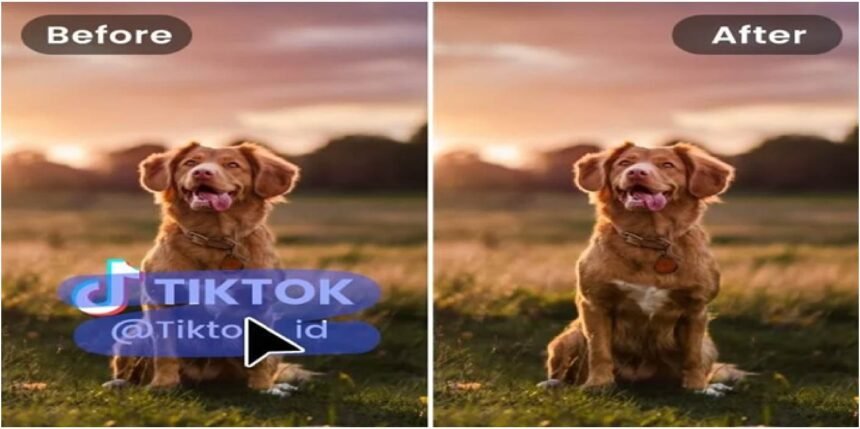
Photos help us capture important memories, but sometimes unwanted objects appear in the background and ruin the perfect shot. Whether it’s a random person walking by, a distracting signboard, or clutter in the background, these elements can reduce the overall quality of your photo. Thankfully, modern technology has made editing easier than ever. With an AI object remover, you can remove unwanted objects from photos instantly without advanced editing skills.
Artificial Intelligence has transformed the way people edit images. What used to require professional software and hours of manual editing can now be done automatically in just a few seconds.
What Is an AI Object Remover?
An AI object remover is a smart tool that uses artificial intelligence to detect and erase unwanted elements from images. These tools analyze the surrounding pixels and intelligently fill the removed area so the photo still looks natural.
Unlike traditional editing software that requires manual cloning or complex selections, AI tools do most of the work automatically. You simply upload your photo, highlight the object you want to remove, and the AI completes the process.
These tools are becoming very popular among photographers, designers, social media creators, and even casual users who want clean and professional-looking photos.
Why AI Object Removal Is So Popular
The popularity of AI-based photo editing tools continues to grow for several reasons.
1. Fast Editing
AI can remove unwanted objects in seconds. What used to take 20–30 minutes in professional editing software can now be done almost instantly.
2. No Technical Skills Required
You don’t need to be a professional photo editor. Most AI tools have simple interfaces where users only need to brush over the unwanted object.
3. Natural Results
Modern AI algorithms analyze the surrounding environment of the image to rebuild the missing background naturally.
4. Works Online
Many AI object remover tools work directly in your browser, so there is no need to install heavy software.
Common Things You Can Remove From Photos
An AI object remover can eliminate many types of unwanted elements from your images.
Some common examples include:
- Photobombers in the background
- Power lines or poles
- Watermarks or logos
- Trash or clutter
- Text or signs
- Unwanted shadows
- Random vehicles or people
These tools are especially useful for travel photos, product photography, and social media content.
How AI Object Removers Work
AI object removal tools use advanced image-processing techniques such as machine learning and deep neural networks. These systems are trained on millions of images so they can understand patterns, textures, and backgrounds.
When you remove an object, the AI performs three main steps:
- Object Detection – The AI identifies the unwanted element in the image.
- Pixel Analysis – It analyzes nearby areas to understand textures and patterns.
- Background Reconstruction – The system fills the removed space with pixels that match the surrounding environment.
The result is a clean and natural-looking image that appears untouched.
Steps to Remove Objects From Photos Using AI
Using an AI object remover is usually very simple. Most tools follow a similar process.
Step 1: Upload Your Photo
Start by uploading your image to the AI editing platform.
Step 2: Highlight the Unwanted Object
Use the brush or selection tool to mark the object you want to remove.
Step 3: Let AI Process the Image
Once selected, click the remove button and allow the AI to analyze the image.
Step 4: Download the Edited Photo
After processing, the tool will display the clean version of your photo. You can then download the final image.
The entire process usually takes less than a minute.
Best Situations to Use AI Object Removers
AI object removal tools are useful in many situations. Some of the most common include:
Travel Photography
Tourist locations are often crowded. AI tools help remove strangers from your photos so you can focus on the scenery.
Social Media Content
Influencers and content creators use AI editing tools to create clean and visually appealing images.
Product Photography
Online sellers can remove background clutter to make products look more professional.
Real Estate Photos
Agents can clean up unwanted objects to improve property images.
Benefits of Using AI Object Removal Tools
There are several advantages to using AI-powered editing tools.
Saves Time
AI editing dramatically reduces the time needed for photo editing.
Cost Effective
Many AI tools offer free versions or affordable subscriptions compared to expensive editing software.
Beginner Friendly
Even people with zero editing experience can create professional results.
Improves Photo Quality
Removing distractions helps make photos look more polished and visually appealing.
Limitations of AI Object Removers
While AI object remover are powerful, they are not perfect.
Some challenges include:
- Complex backgrounds may produce imperfect results.
- Large objects covering important parts of the image may be harder to remove.
- Some free tools may reduce image resolution.
However, AI technology continues to improve, and new tools are becoming more accurate every year.
The Future of AI Photo Editing
The future of AI photo editing looks very promising. New technologies are being developed that can automatically enhance lighting, replace backgrounds, and even generate missing parts of images.
Soon, AI tools may be able to perform advanced editing tasks with just one click. This will make professional-quality photo editing accessible to everyone.
Conclusion
An AI object remover is one of the most useful tools in modern photo editing. It allows users to quickly remove unwanted objects from photos without professional skills or expensive software.
Whether you are a photographer, social media creator, or just someone who loves taking pictures, AI editing tools can help improve your images instantly. With just a few clicks, you can transform an ordinary photo into a clean and professional-looking image.
As artificial intelligence continues to evolve, removing unwanted objects from photos will become even faster, smarter, and more accurate.


