



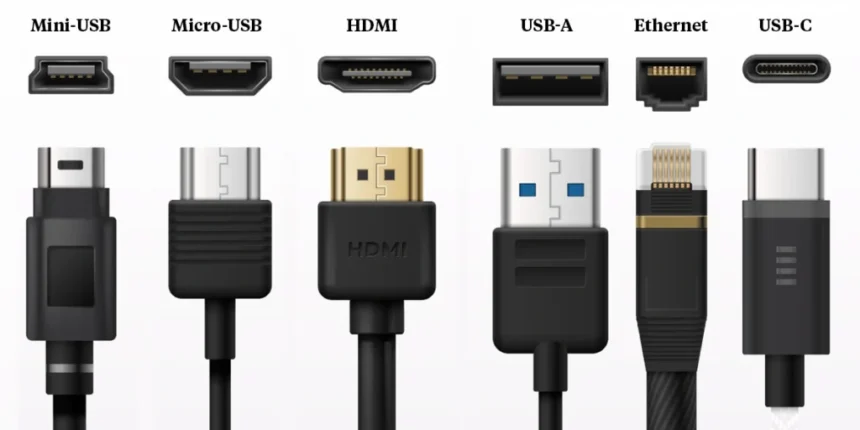
Why Understanding USB Types Matters Today
USB technology powers almost every modern device we use daily. From charging phones to transferring data, USB plays a key role. Many buyers start by comparing USB prices in Pakistan when shopping for cables or accessories. However, choosing the wrong USB type often leads to slow charging or poor performance. This confusion happens because USB names sound similar but work very differently. Understanding the basics helps avoid wasted money.
Moreover, not every USB cable delivers the same speed or power. Some cables only charge devices. Others support fast data transfer and video output. Therefore, knowing what each USB type does saves time and frustration. It also protects devices from damage. A little knowledge makes every purchase smarter.
A Simple Breakdown of Common USB Types
USB types refer to the shape of the connector and its capabilities. USB A remains the most common and familiar type. It appears on computers, chargers, and power banks. USB B mostly appears on printers and older equipment. Meanwhile, USB C has become the modern standard.
USB C offers reversible design and higher performance. It supports fast charging and data transfer. Many new laptops and phones rely on it. However, older devices still use USB A. Understanding compatibility avoids connection issues. This clarity makes daily use smoother.
USB A and USB B Explained
USB A has a rectangular shape. It only plugs in one direction. Despite its age, it remains widely used. Many accessories still rely on USB A ports.
USB B looks more square and bulky. It appears on printers and scanners. Although less common now, it still serves a purpose. These types show how USB evolved over time. Knowing them helps identify cables correctly.
Understanding USB Versions and Speeds
USB versions determine data speed and power delivery. USB 2.0 supports basic charging and slow data transfer. USB 3.0 and later versions offer much faster speeds. These differences affect performance greatly.
Consumers often overlook version numbers. As a result, they experience slow transfers unknowingly. Checking version support ensures optimal performance. Faster versions suit external drives and displays. Slower ones work for simple accessories.
USB 3.0, 3.1, and 3.2 Differences
USB 3.0 introduced a major speed upgrade. USB 3.1 improved power delivery. USB 3.2 further enhanced performance. These versions often look identical physically.
However, their internal capabilities differ. Always check specifications before buying. Comparing features alongside usb price in Pakistan ensures value. Higher versions cost more but deliver better results. Smart choices depend on usage needs.
USB C and Its Growing Popularity
USB C represents the future of connectivity. Its reversible design improves convenience. Users no longer worry about orientation. It supports fast charging, data, and video through one cable.
Additionally, USB C reduces cable clutter. One cable handles multiple tasks. This versatility makes it popular across devices. Phones, laptops, and tablets all benefit. USB C simplifies modern setups.
Power Delivery and Fast Charging
USB C supports Power Delivery technology. This feature enables fast and safe charging. Devices communicate power needs automatically. This prevents overheating and damage.
Fast charging saves time during busy days. It also supports high power devices like laptops. When checking usb price in Pakistan, ensure cables support Power Delivery. Not all USB C cables offer this feature. Quality matters more than appearance.
Choosing the Right USB Cable for Your Needs
Choosing the right cable depends on purpose. Charging needs differ from data transfer needs. Short cables reduce power loss. Longer cables add convenience but may reduce speed.
Quality materials improve durability. Cheap cables break easily and cause issues. Reading specifications helps avoid poor performance. Matching cable type with device ensures safety. Thoughtful selection improves daily experience.
Data Transfer vs Charging Only Cables
Some cables only charge devices. Others support data transfer as well. Using the wrong cable limits functionality. This mistake happens often.
Always check labeling before purchase. Look for speed ratings and certifications. Comparing options with usb price in Pakistan helps identify quality products. Spending slightly more avoids replacement costs. Reliable cables last longer.
USB Ports and Device Compatibility
USB ports vary across devices. Older computers offer USB A ports. Newer models include USB C. Some devices include both for compatibility.
Using adapters solves connection gaps. However, adapters may reduce performance. Direct connections always work better. Knowing port types helps plan purchases. Compatibility ensures smooth usage.
Adapters, Hubs, and Expanders
USB hubs expand port availability. They connect multiple devices at once. However, power and speed may divide among ports.
Choosing powered hubs improves performance. Cheap hubs may fail quickly. Checking reviews and usb price in Pakistan helps select reliable options. Proper accessories protect devices and improve efficiency.
Final Thoughts on Picking the Best USB Option
USB technology continues to evolve rapidly. Understanding types and versions empowers smart decisions. The right cable improves speed, charging, and safety. The wrong choice causes frustration and delays.
As the market grows, usb price in Pakistan varies widely across products. Knowledge ensures value for money. Investing in quality USB accessories enhances daily life. Smart choices today prevent problems tomorrow.


