



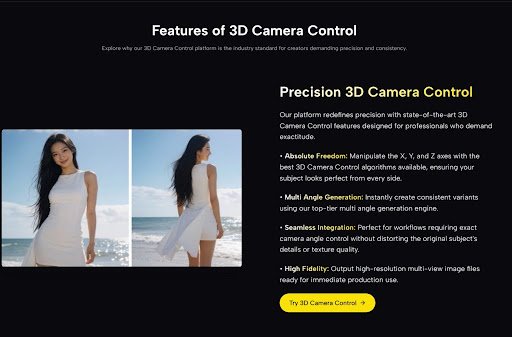
If you are a digital artist, a game developer, or an e-commerce brand manager, you know this specific type of pain intimately. You finally generate the perfect image using tools like Midjourney, or you capture the ideal product photo. The lighting is sublime, the composition is striking, and the mood is exactly right.
But then, the client asks the dreaded question: “Can we see it from the side?”
Suddenly, your perfect asset feels like a trap. In the past, answering that question meant hours of manual repainting, firing up complex 3D software like Blender to build a mesh from scratch, or organizing an entirely new photoshoot. It was a creative bottleneck that killed momentum.
I recently found myself in this exact scenario with a character concept. While searching for a solution that didn’t involve starting over, I decided to test a tool designed specifically for 3D Camera Control AI. The promise was intriguing: take a flat JPEG and rotate it as if it were a physical object.
How It Works: A Personal Observation
From Flat Pixels to Spatial Depth
To understand what is happening here, we need to move past the marketing buzzwords and look at the mechanics. When I uploaded my reference image into the system, it didn’t just “stretch” the pixels.
From my observation, the AI appears to be generating an inferred Depth Map. Think of this like a topographic map for your image. The AI analyzes the lighting, shadows, and contours to “guess” how far away each pixel is from the camera. It effectively hallucinates the 3D geometry that should be there, creating a virtual mesh on the fly.
The “Digital Puppeteer” Experience
The interface provided three distinct sliders: X, Y, and Z axes.
- The X-Axis: Tilts the subject up and down.
- The Y-Axis: Rotates the subject left and right (the most useful feature in my tests).
- The Z-Axis: Adjusts the roll or distance.
When I started sliding the Y-axis control, the experience was less like editing a photo and more like walking around a statue in a museum. It wasn’t perfect—I’ll get to the limitations later—but the sensation of seeing “behind” a 2D character was genuinely exciting.
The Workflow Shift: A Comparative Analysis
To visualize just how different this approach is compared to the traditional pipeline, I’ve broken down the differences based on my testing.
Traditional 3D Workflow vs. AI Camera Control
| Feature | Traditional 3D Modeling/Repainting | AI Video Generator Agent |
| Time Investment | Hours to Days. Requires modeling, texturing, rigging, and rendering. | Seconds to Minutes. Instant generation based on slider input. |
| Skill Barrier | High. Requires knowledge of topology, lighting engines, or advanced perspective drawing. | Low. If you can move a slider, you can use the tool. |
| Consistency | Fixed. Once modeled, the object is mathematically rigid. | Fluid. AI creates variations; excellent for ideation, though micro-details may shift. |
| Flexibility | Rigid. Changing the base design requires remodeling. | Dynamic. Upload a new 2D sketch and immediately start rotating it. |
| Cost | High. Expensive software fees or specialized labor costs. | Cost-Effective. Browser-based and significantly cheaper. |
Real-World Applications: Where This Shines
Based on the output quality I received, this isn’t just a toy; it is a rapid-prototyping utility that fits specific niches very well.
For Game Developers (The Sprite Sheet Saver)
If you are an indie dev creating a 2.5D game or a visual novel, you often need a “turnaround”—front, side, and back views of a character. I found that while the AI might miss a specific button on a jacket when rotated 90 degrees, it gets the volume and silhouette 90% right. It provides an immediate base that you can paint over, saving hours of perspective guesswork.
For E-Commerce & Mockups
I tested this with a product image of a sneaker. Being able to slightly rotate the product to show the heel or the toe box without a reshoot allows for dynamic social media posts. It turns a single “hero shot” into a carousel of content. It won’t replace a $5,000 studio shoot for a billboard, but for daily Instagram content? It’s a game-changer.
The Reality Check: Managing Expectations
As an advocate for responsible tech adoption, I must be transparent about the limitations I encountered. This is not magic; it is probabilistic mathematics.
The “Hallucination” Factor
When you rotate a 2D image 180 degrees, the AI has to invent information that never existed. What does the back of that character look like? The AI makes an educated guess. In my tests, sometimes these guesses are brilliant; other times, the AI might blend hair into the clothing or create a “dream-like” texture where a zipper should be.
The Sweet Spot
I found the tool performs best with rotations between 15 to 45 degrees.
- Small adjustments: Look incredibly realistic and stable.
- Extreme rotations (90°+): May require multiple generations to get a clean result or a bit of Photoshop cleanup afterwards.
It is important to view this not as a “one-click finish” button, but as a “one-click draft” that gets you 80% of the way to a complex goal.
Conclusion: A New Dimension of Control
The ability to manipulate the camera angle of a static image represents a fundamental shift in how we interact with digital assets. We are moving away from “flat” files towards “spatial” assets that are flexible and alive.
Whether you are trying to visualize a character from a new angle or simply need to tweak a product photo, 3D Camera Control AI offers a bridge between 2D imagination and 3D reality. It allows you to stop fighting with perspective and start focusing on creation.
It’s imperfect, it’s evolving, but it is undoubtedly a powerful ally for anyone tired of being stuck in two dimensions.