



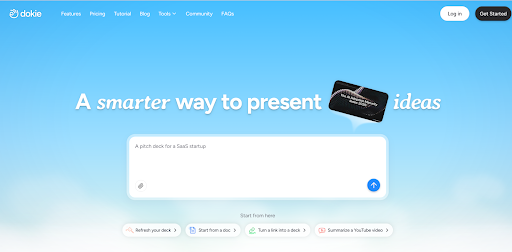
Most AI presentation tools feel impressive at first, but fall apart when you actually try to use the slides in a real meeting. The designs look nice, but the structure is often weak, and you end up rebuilding the deck anyway.
Dokie AI takes a different approach.
Instead of focusing on “wow” visuals, it focuses on something more practical: generating slides that already follow a usable presentation flow. That makes it especially relevant for business users who care about clarity, logic, and speed.
First Impressions
When you first use Dokie AI, the biggest difference is how the output feels.
Instead of random slides loosely connected together, the deck usually follows a familiar structure:
- introduction
- context or problem
- key data or points
- insights
- conclusion
That may sound basic, but it’s exactly what most business presentations need.
Many tools can generate slides. Fewer can generate a deck that feels like something you could actually present without heavy restructuring.
Core Features
Dokie AI is not just a prompt-to-slide generator. It’s closer to a workflow tool for turning content into presentations.
Key capabilities include:
- generating full decks from prompts or notes
- converting files into slides (PDF, Word, Excel, etc.)
- exporting clean PPT files for real use
- creating structured, business-style presentations
One notable addition is its Social Carousel feature, which lets users turn content into multi-slide visuals for platforms like LinkedIn. This shows the product is expanding beyond traditional presentations into broader content formats.
Real Workflow: How It Actually Fits
A typical workflow with Dokie AI looks like this:
- Input messy notes, data, or an outline
- Generate a full deck
- Review the structure (usually already usable)
- Adjust key slides (insights, summary, data-heavy slides)
- Export to PPT
The key difference is step 3.
With many tools, you spend most of your time fixing structure. With Dokie, that part is often already done, which is where the real time saving comes from.
Where Dokie AI Stands Out
1. Structure > Design
Dokie AI is clearly built around structured output.
It doesn’t try to be the most visually creative tool. Instead, it tries to generate slides that make sense in a business context. That’s a big advantage for:
- reports
- strategy decks
- client presentations
2. Closer to “Presentation-Ready”
Many AI tools give you a draft.
Dokie AI often gives you something closer to a usable version. You still need to polish it, but you’re not starting from scratch or reorganizing everything.
3. Strong for File-to-Slides Use Cases
The ability to convert files into slides (like PDF, Word, Excel) makes it more practical for real work.
Most presentations don’t start from a blank idea. They start from existing materials. This is where Dokie becomes more useful than prompt-only tools.
Pros
- Generates more structured, business-ready decks
- Reduces time spent reorganizing slides
- Works well for reports and professional presentations
- Supports multiple input formats (not just prompts)
- Output feels closer to real PPT workflows
Cons
- Design is solid but not exceptional
- Less suitable for highly creative or visual storytelling
- Still requires manual polishing for important slides
- Not as well-known as larger platforms
Dokie AI vs Other AI Presentation Makers
Compared to other tools:
- Tools like Gamma focus more on speed and modern layouts
- Tools like Canva focus more on templates and design flexibility
- Tools like Plus AI focus on integration with existing workflows
Dokie sits in a different position:
it focuses on usable structure and business practicality
That makes it less flashy, but often more useful in real work scenarios.
Who Should Use Dokie AI?
Dokie AI is a good fit if you:
- create business presentations frequently
- build reports, strategy decks, or client slides
- want to save time on structuring slides
- start from messy notes or existing documents
It’s not the best fit if you:
- care primarily about visual creativity
- need highly interactive presentations
- want design-heavy, marketing-style slides
Final Verdict
Dokie AI is not trying to be the most impressive AI presentation maker.
It’s trying to be one of the most useful.
If your goal is to get from raw content to a clean, structured, presentation-ready deck faster, it does that well. You’ll still need to refine key slides, but the time saved on structure alone makes it worth considering.
For business users, that trade-off makes sense.


